
Proposals View
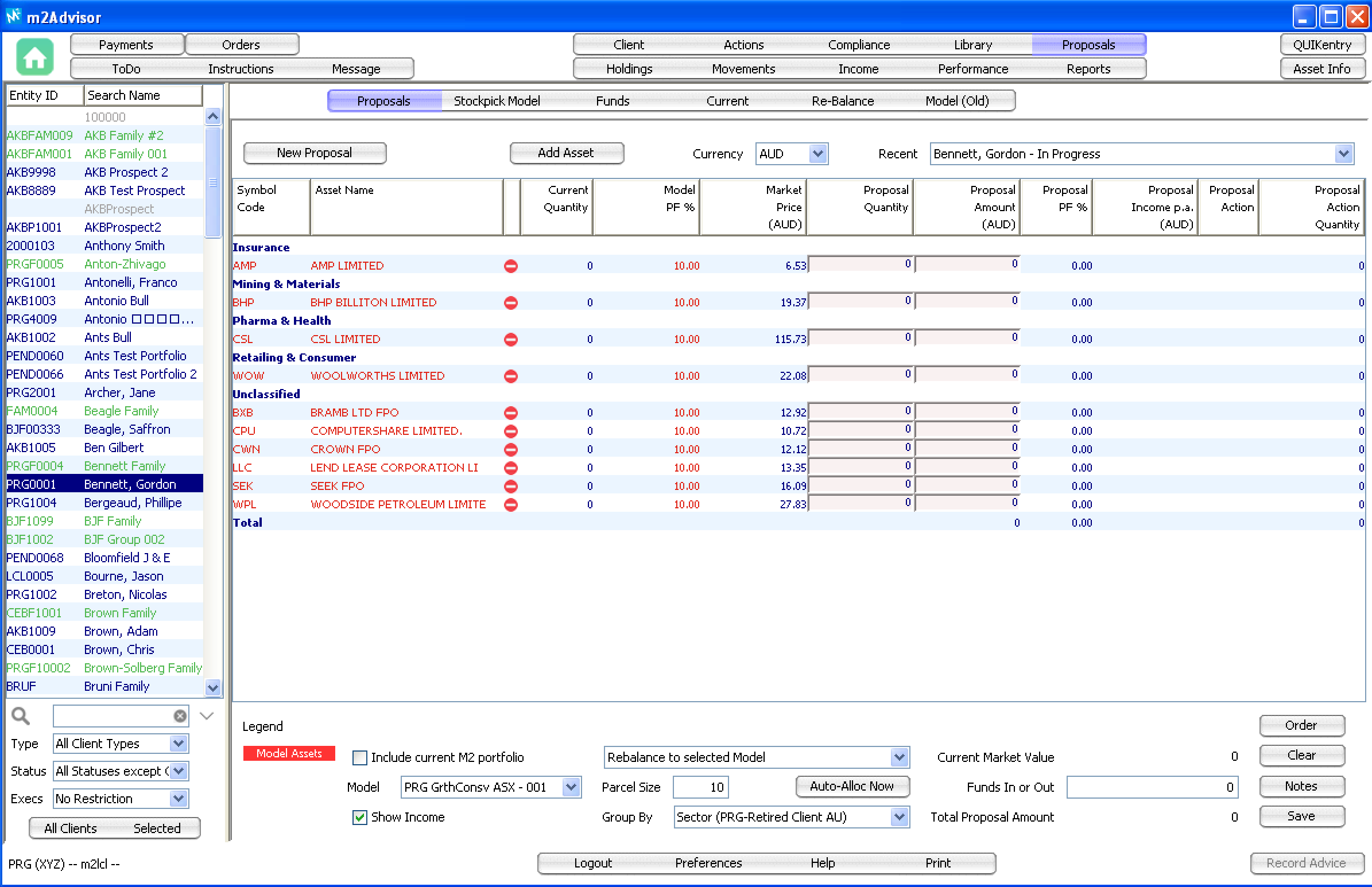
Proposals View is where an advisors can create a potential portfolio on the fly for clients.
You can apply a pre-set portfolio model to a new client or modify an existing client's portfolio with a different investment model.
New clients:
For new clients, you can add the customer's details and their current portfolio holdings directly into the Proposals View. The system will generate a Holdings view based on the input information.
There are 2 ways to create a proposal portfolio:
1. manually enter the individual investment assets you would like to recommend to the client or
2. pick from a pre-set ‘Stockpick Model’ (e.g. PRG Growth Conservative ASX).
An advisor can create a pre-set portfolio model on the Stockpick Model tab and choose to keep the portfolio model private or make it available to the firm.
When you create and save a proposal for a new client, the system will automatically create a Prospect client record in the Client view.
Existing clients:
For an existing client, an advisor can create what-ifs investment scenarios if the client deposit additional funds or redraw funds from the portfolio as well as applying different investment models to the current portfolio.
If a client is happy with the changes, the advisor can print a report that will show the portfolio holdings after the rebalancing and the necessary buy/sells required.
Comments
0 comments
Please sign in to leave a comment.